

Latest Version
Rocky Sand Studio Ltd.
Tools
Mac
Free
1238129192
Report a Problem
More About Open Any File
The Ultimate Utility to Open Any File and Identify Mac Formats
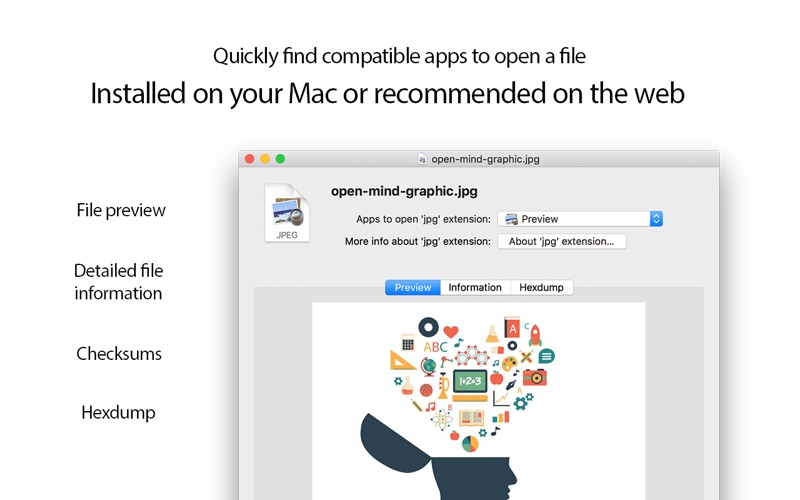
Have you ever encountered a mysterious document on your Mac that refused to double-click into action? The Open Any File file utility by Rocky Sand Studio Ltd. is designed to solve this exact headache. Positioned as a versatile utility in the macOS ecosystem, this lightweight tool acts as an intelligent intermediary, helping you discover which of your installed applications can handle an uncooperative file format, while offering quick web-search alternatives when offline solutions fall short.
Who Benefits Most from This macOS Tool?
While casual users will appreciate the seamless Finder integration to quickly resolve format errors, the app is particularly beneficial for:
- Power Users & System Administrators: Those who regularly handle obscure file extensions and need to identify raw data structures without launching heavy IDEs.
- Security Conscious Professionals: Users who need to verify download integrity using cryptographic signatures.
- Developers: Anyone requiring a quick, native look at binary payloads or raw hex values.
Key Features of the Open Any File File Utility
This software is more than a simple file router. It packs several advanced diagnostic features directly into a minimalist interface:
1. Intelligent App Mapping & Web Search
When you trigger the app, it immediately scans your macOS system to compile a clean list of compatible, installed programs. If no local matches exist, a single click launches a targeted web search to help you find the necessary software online.
2. Advanced Metadata and File Inspections
For technical users, the utility exposes critical underlying data about your target files:
- Cryptographic Checksums: Instantly calculate SHA1, SHA256, MD2, and MD5 hashes to verify that your files have not been corrupted or altered.
- HEX Dump Viewer: Inspect the raw binary content of any file to analyze headers and internal structures.
- General Information: View deep system-level metadata associated with the document.
3. Seamless macOS Integration
The developer has ensured that using the Open Any File file utility feels completely native. You can drag and drop documents directly onto the Dock icon, or access its features instantly via Finder's control-click contextual menu and the system Services menu.
Final Verdict
If you are tired of dealing with unrecognized attachments and unknown formats, this tool offers a highly efficient, lightweight solution. By combining file routing with advanced diagnostics like hex inspection and checksum verification, it earns a permanent spot in any Mac user's toolkit. To try this utility on your Mac, visit the official Mac App Store to explore its features today.
Rate the App
User Reviews












Popular Apps










Editor's Choice