
Latest Version
Adam Honse, OpenRGB Team
Tools
Linux
Free
org.openrgb.OpenRGB
Report a Problem
More About OpenRGB
The single most frustrating part of building a modern PC is the bloated, fragmented software required to control your lights. OpenRGB universal lighting control solves this headache by replacing a dozen conflicting, resource-heavy manufacturer apps with one lightweight, open-source program. Developed by Adam Honse and the OpenRGB Team, this utility rescues your system resources and puts you back in charge of your hardware's aesthetics.
Why OpenRGB Universal Lighting Control is a Game Changer
Typically, mixing different hardware brands means running multiple proprietary background services that hog RAM and CPU cycles. OpenRGB universal lighting control eliminates this proprietary lock-in. It operates independently of official software, allowing you to configure devices from various manufacturers within a unified, clean interface on both Linux and Windows platforms.
Key Features of the OpenRGB Ecosystem
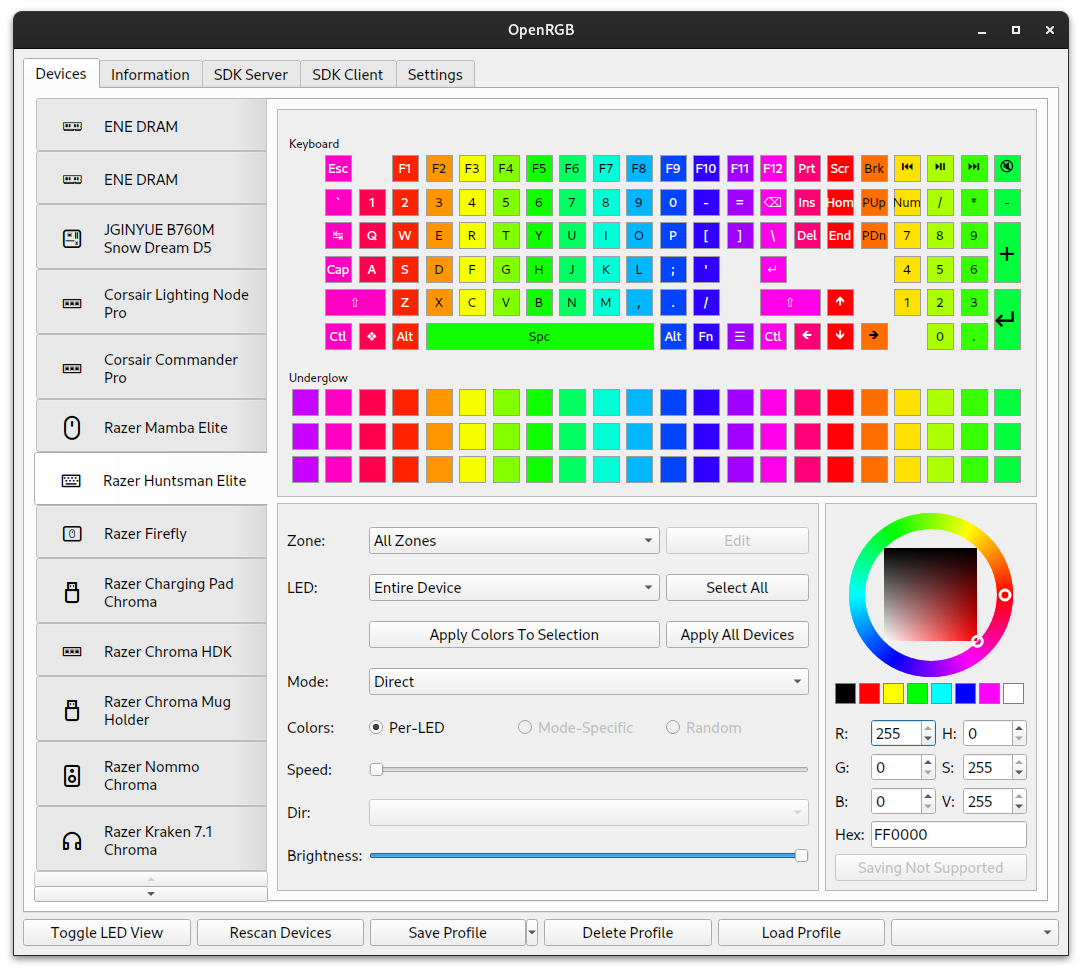
- Broad Hardware Compatibility: Set colors and select dynamic effect modes across a wide variety of supported RGB components and peripherals.
- Profile Management: Create, save, and load custom lighting profiles to match your mood or setup theme instantly.
- SDK and Third-Party Integration: Control your lighting setup using external software via the built-in OpenRGB Software Development Kit (SDK).
- Command Line Interface: Script your lighting or integrate configurations directly into startup routines using robust CLI commands.
- Multi-PC Synchronization: Connect multiple active instances of the software to sync your lighting themes seamlessly across different computers.
- Headless Server Support: Run the application in a standalone GUI mode or as a client/headless server configuration for remote setups.
- Interactive LED Mapping: A graphical representation of your hardware's LEDs makes designing complex, custom visual patterns incredibly straightforward.
Who is this Utility For?
This software is a must-have for Linux enthusiasts who are traditionally locked out of Windows-only RGB controller suites. It is also ideal for PC minimalists who despise background bloat, telemetry, and mandatory online account requirements just to change a keyboard color. Whether you are running a single rig or coordinating complex lighting across multiple systems, this tool offers the precise, lightweight management you need.
Take Control of Your Hardware Setup
If you are ready to declutter your operating system and enjoy a unified, lightweight approach to customization, this open-source tool is the perfect remedy. You can explore this application and check its compatibility list on the official Flathub store page today.
Rate the App
User Reviews













Popular Apps










Editor's Choice